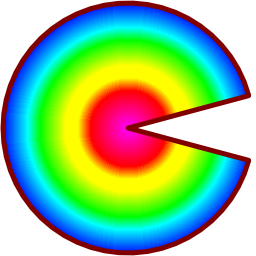
DrawPolygon
procedure DrawPolygon(img: TImage32; const polygon: TPathD; fillRule: TFillRule; color: TColor32; unweighted: Boolean = false); overload;
procedure DrawPolygon(img: TImage32; const polygon: TPathD; fillRule: TFillRule; renderer: TCustomRenderer; unweighted: Boolean = false); overload;
procedure DrawPolygon(img: TImage32; const polygons: TPathsD; fillRule: TFillRule; color: TColor32; unweighted: Boolean = false); overload;
procedure DrawPolygon(img: TImage32; const polygons: TPathsD; fillRule: TFillRule; renderer: TCustomRenderer; unweighted: Boolean = false); overload;
Antialiasing and 'weighting'.
In Image32, an extra 25% 'weight' is usually added to antialiased polygon edges. This extra weight makes polygons ever so slightly larger, and this virtually eliminates background color 'bleed through' that can occur where edges of adjacent polygons touch. While this extra 25% 'weight' is applied by default to polygons, this can be bypassed by setting the unweighted parameter to true. (Note: this additional weight is not applied to line and text drawing because it can make them appear very slightly bolder than expected.)
Polygons with default 'weighting' ...
img2 := TImage32.Create(100,100);
img2.Clear(clWhite32);
// Draw two polygons that together make a black square.
// Use the default 'weighted' antialiasing
p := MakePath([10,10, 33,10, 66,90, 10,90]);
DrawPolygon(img2, p, frEvenOdd, clBlack32);
p := MakePath([90,10, 90,90, 66,90, 33,10]);
DrawPolygon(img2, p, frEvenOdd, clBlack32);
img2.SaveToFile('c:\temp\polygon_aa125.png');
img2.Free;
|

|
| In the image above 2 polygons together to make a single black square.
|
Polygons without 'weighting' ...
img2 := TImage32.Create(100,100);
img2.Clear(clWhite32);
// Draw two polygons that together make a black square.
// This time however, omit weighted antialiasing.
p := MakePath([10,10, 33,10, 66,90, 10,90]);
DrawPolygon(img2, p, frEvenOdd, clBlack32, true);
p := MakePath([90,10, 90,90, 66,90, 33,10]);
DrawPolygon(img2, p, frEvenOdd, clBlack32, true);
img2.SaveToFile('c:\temp\polygon_aa100.png');
img2.Free;
|

|
| In the image above there is now a very faint line separating these 2 polygons. This is caused by the background color 'bleeding through' where these polygons meet.
|
Example 1
  uses Img32, Img32.Fmt.PNG, Img32.vector, Img32.Draw;
  ...
  var
    img: TImage32;
    path: TPathD;
    rec: TRect;
  begin
    img := TImage32.Create(256,256);
    rec := img.Bounds;
    Windows.InflateRect(rec, -8,-8);
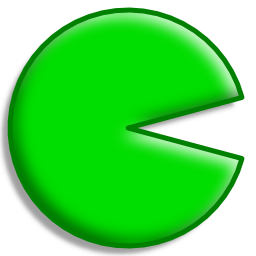
    path := Pie(rec, angle15, -angle15);

    //start with a drop shadow
    DrawShadow(img, path, frNonZero, 8);
    //draw the polygon
    DrawPolygon(img, path, frNonZero, $FF00DD00);
    //and add a 3D button effect
    Draw3D(img, path, frNonZero, 10,6);
    //finish with a solid green outline
    DrawLine(img, path, 5, clGreen32, esPolygon);

    img.SaveToFile('pie.png');
    img.Free;
  end;
Example 2
uses Img32, Img32.Fmt.PNG, Img32.vector, Img32.Draw;
  ...
var
  img: TImage32;
  rec: TRect;
  path: TPathD;
  imageRenderer: TImageRenderer;
begin
  img := TImage32.Create(256,256);
  rec := Rect(6,6, 250,250);
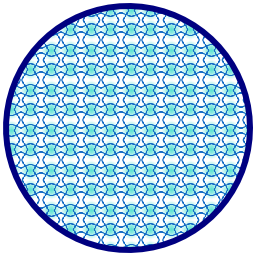
  path := Ellipse(rec);
  imageRenderer := TImageRenderer.Create(tfsRotate180);
  imageRenderer.Image.LoadFromResource('TILE', 'BMP');
  imageRenderer.Image.Resize(20,20);
  DrawPolygon(img, path, frEvenOdd, imageRenderer);
  DrawLine(img, path, 6, clNavy32, esPolygon);
  img.SaveToFile('tiled_ellipse.png');
  imageRenderer.Free;
  img.Free;
end;
Example 3
  uses Img32, Img32.Fmt.PNG, Img32.vector, Img32.Draw;
  ...
  var
    img: TImage32;
    path: TPathD;
    rec: TRect;
    radGradRend: TRadialGradientRenderer;
  begin
    img := TImage32.Create(256,256);
    rec := img.Bounds;
    Windows.InflateRect(rec, -3,-3);
    path := Pie(rec, angle15, -angle15);

    //setup the gradient colors
    radGradRend := TRadialGradientRenderer.Create;
    radGradRend.SetParameters(rec, clFuchsia32, clBlue32);
    radGradRend.InsertColorStop(0.3, clRed32);
    radGradRend.InsertColorStop(0.4, clYellow32);
    radGradRend.InsertColorStop(0.5, clYellow32);
    radGradRend.InsertColorStop(0.7, clLime32);
    radGradRend.InsertColorStop(0.8, clAqua32);
    //do the drawing
    DrawPolygon(img, path, frNonZero, radGradRend);
    DrawLine(img, path, 5, clMaroon32, esPolygon);

    img.SaveToFile('pie3.png');
    radGradRend.Free;
    img.Free;
  end;
Copyright ©2010-2023 Angus Johnson - Image32 4.8 - Help file built on 5 Jul 2025